Dream View SEO

Translate

Pages

Introduction

A helpful checklist / collection of Search Engine Optimization (SEO) tips and technics. Search engine marketing services of search engine optimization, pay per click and paid inclusions in various search engines.

Did you know that
50-70% of consumer and business purchasers start with a search engine like Google? If your website doesn't appear at the top of a search engine results page (sponsored ads or organic search results), you're losing potential customers to companies that rank higher.

What can you do?

In this blog with easy steps, I'll share with you my top strategies and tactics that can help you acquire new customers via Search Engine Optimization and Advertising.

Google Search

Forex Trading Join and Earn

Friday, June 17, 2016

Title Tags for SEO

Title Tags and Why They Matter

When you search in Google, the search results on the next page each start with a blue underlined link.


What displays in this blue link is usually what is contained in the title tag of a web page. The keywords you placed in the search box are usually boldfaced in the search results.
So, just what is a title tag, and why does it matter for search engine positioning?

According to the World Wide Web Consortium, the Title tag was designed to help people "identify the contents of a document." When people view individual web pages out of context (often via search), context-rich page titles help tell the visitor a summary of the page.

Instead of a title like "Introduction", which doesn't provide much contextual background, web designers should supply a title such as "Introduction to Medieval Bee-Keeping" instead.

Google and other search engines use these rich contextual clues as a way to hone its search results. On a web page, the title tag is part of the HTML code. Here's what the code looks like on Customer Paradigm's site:

<title>Customer Paradigm: Website Design, Development, Email Marketing, Content Management, PHP programming</title>

Most end users won't see the title tag. But if you remember back to my email tip about subject lines, the title tag is what a subject line is to an email campaign: It entices the end user to pay attention and open the page to read more.

Top Five Most Common Mistakes for Title Tags:

1. Untitled: When many of the popular programs create a new HTML page, it puts 'Untitled' into the title tag. It's up to the Web designer to change this... and since most users don't see it, sometimes they forget to change it.

2. No Title Tag: Like the "Untitled" tag, another key mistake is simply leaving out the title tag. If you do a view source (Internet Explorer: View —> Source), and the title tag appears like:
<title></title>
 ... then you don't have a title tag.

3. “About” Tag: Another common mistake for title tags is to have the title tag refer to a section of your website. But a title tag that reads, "About" doesn't tell me much about what the company or website is "About." Instead, have it read:

<title>Customer Paradigm - About the Company: Website Development & Marketing, Email Deployment, and PHP programming</title>

This is sure to get more keywords into the title tag, and if you're searching for a company, you instantly know what they do. 

4. No Company Name In Title Tag: We recommend putting your company name at the beginning of the title tag, so that people can quickly see your company's name when they search.

5. Same Title Tag on Multiple Pages: You should have a unique title tag for each page of the site. Why? As each page is unique, you should have a title tag that describes it's unique content. If your messaging is not relevant, however, you’re quickly going to find that your messages are filed in the "I’ll get to these
later" pile.

Search Engines Confuse with Graphics

Don't confuse the Search Engines with Graphics

Search engines are really good at reading text. But they're very easily confused. And if Google gets confused when it crawls through your site, you won't rank very high in search results. Search engines, for example, can't read words that are contained in graphics or flash animation. So if your company's name is only contained in a graphic on your site, this content is ‘invisible' to a search engine. Same thing goes for product or service names.

The root of the problem lies with graphic designers. Graphic designers are really good at building graphics. Don't take this to mean I don't like graphic designers (I employ a bunch of them), but they sometimes don't know how to create SEO-friendly design.

Most websites, however, are designed by graphic designers who are really good at building graphics, and less interested in Search Engine Optimization (SEO). It takes a bit more time to have content placed in text, and use a stylesheet to format it so that a search engine can read it. Especially when it's so easy to create a good looking graphic in Photoshop.

Here's an example of a graphic:


Here's how it could be formatted, instead, using text and a cascading stylesheet (CSS): See the title of this section (above) for a live example. 


Some sites use all flash (and are thus invisible to search engines). While the sites may look pretty to humans, to Google the content is completely invisible. If you look at Google’s cache (go to www.Google.com and type in the site’s name, click on the “cached” results), you can see that there is no text or content that appears.

Even if you're not worried about organic search positioning, but are doing paid search engine marketing (like Google Adwords), it's important that the content on your site is easily digested by a search engine.

Why? Google Adwords ranks the pages on your website, and compares it to your keywords and ad copy. The more relevant Google ranks the text on your site, the less you'll have to pay for a sponsored ad on Google (and the higher your position).

In Summary: Don't confuse search engines by keeping your content ‘locked up' in graphics. It's a small little detail in the web design process, but one that will pay dividends for a long, long time with increased search results.

Wednesday, June 15, 2016

Domain SEO

Ultimate Tips to Domain SEO

 Domain seo keywordFirst things first, a lot of beginners in online marketing would ask what is a domain? Some business owners who are planning on having their own website may ask why do I need a good domain name. A domain is the address that you type in the address bar of your browser. For examples www.google.com, www.youtube.com, www.facebook.com and www.hotmail.com etc.

Brand recognition

A good domain name gives your website brand recognition and Search Engine recognition. Brand recognition is important if you want your customers to remember what you website stands for and Search Engine recognition is important it you want search engines like Google, Bing, Yahoo and others to give preference your competitors in the Search Engine Results Page or SERP.

Before you buy your first domain name it is important to "Do Keyword research first then buy a domain". Keyword Research is important because you want to find out first if the domain name that you will buy has some commercial viability to it and if people are really searching for it.

Rich Domains

When choosing domain names it is important to choose keyword rich domains because search engines like Google, Bing, Yahoo and others see keywords as an important factor in ranking your website in their Search Engine Results Page. Choosing keyword rich domain names saves you a lot time, money and effort in ranking your websites compared to not choosing keyword rich domains.

I cannot reiterate how important it is to choose keyword rich domains if you want to rank faster and higher in the Search Engine Results Page or SERP with less effort and time. To help you out, here is Domain SEO which lists the different keyword matches, domain extensions and other important points to consider when choosing your own domain name that will last through the years.


Keywords Matches


I have point out some important examples of  Keywords Matches:

1. Exact Match     --    carhire.com : "Rank Highest"

2. Phrase Match   --    mycarhire.com

3. Board Match    --    hiremycar.com

4. No Match          --    johmcarrentals.com

Domain Extensions or Categorization


1- gTLD (Generic Top Level Domain) - .com, .net, .org

2- ccTLD (Country Code Top Level Domain) - .com.au, .co.us, .co.uk, .ph, .ca, .pk, .in - country specific

Points to consider:

1-
 .com's hold the greatest resale value and brand recognition compared to .net or .org

2- Some SEO Experts claim that  .com hold's and SEO advantage over other domain extensions.

3- Between .net and .org - some SEO experts experience better ranking with .org's
 

Tuesday, June 14, 2016

Local SEO (Local Search Engine Listing)

Local SEO (Local Search Engine Listing)
Local SEO or local search engine optimization is the process of optimizing your site so you can gain higher local search rankings. It is optimization process for the local results in various search engines. This type of search engine optimization is crucial for those with brick and mortar stores or businesses that have a local presence.

Local SEO is an art and this will also allow you to be easily located by people, especially in the case of mobile searchers currently in your area of operations. But local SEO and its processes differ from SEO that target ranking globally.

For businesses that serve specific geographic regions (i.e. Denver, Colorado), you can create search engine ads in Google and Yahoo that only appear to people in your area.

How does this work? A search engine like Google uses a computer's IP address and other information to discover where someone is searching (including city and state).

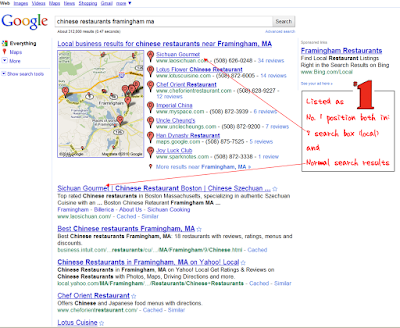
Why does Google care where a person is located? Google's mission is to give their end users the best search results possible. So, if I need someone to Chinese Restaurants Framingham, MA, it does me little good to receive a paid search result from Framingham . This is a real example — my brother has a petsitting business, and I've used local Google search engine advertising to drive new clients to his organization.

Thus Google (and the others) tries to match search results to the geographic location of the person searching.

 Local SEO (Local Search Engine Listing)

How does Google make money? Google gives businesses and organizations the ability to display paid advertisements (sponsored results) on search results pages. These ads are triggered by keywords you choose (more on this in a different strategy).

You don't have to pay for your ad to display; you pay Google only when someone clicks on your ad. The technical term is Cost Per Click (CPC) advertising. The more relevant your ad (more on this later), the less you have to pay for specific keywords, and the higher up you will appear in the
sponsored advertising results.

Local Search CPC Ads. In Google Adwords, you can create an advertising campaign that will target someone in a specific city or state. You can even specify a 5, 10 or 25 mile radius from a specific location (like your retail showroom or office). Below your local ad, Google will place the name of your local area (i.e. Denver, Colorado)... making it more likely that someone searching in your area will choose your organization vs. an out-of-town competitor.

Local CPC Ads are usually a more cost effective option than a national search engine advertising campaign. As a general rule of thumb, the more geographically targeted and specific you can be, the less money you'll need to pay to acquire new customers. And make sure you have conversion tracking code placed on your site, so you can measure and track how much you're paying for each new customer via local search engine advertising.

Followers